
Free Seasonal Food Worksheet | Year 4 Core | BookFlik
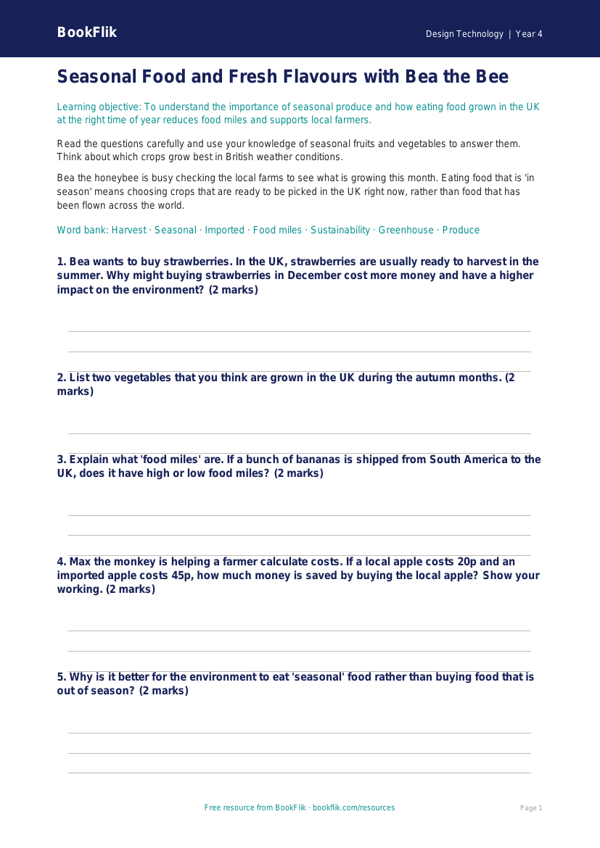
Teach your class about the importance of eating local and fresh with our engaging Design Technology seasonal food worksheet year 4 core resource. This activity is specifically designed to help pupils understand where their food comes from and why choosing ingredients that are in season is beneficial for the environment and our health. By exploring the natural growing cycles of fruit and vegetables in the UK, children will develop a deeper appreciation for sustainable food choices and the journey from farm to fork.
In this Design Technology seasonal food worksheet year 4 core, students will learn to identify which crops are ready to harvest during different times of the year. They will complete a series of tasks, including categorising produce by season, designing a balanced, seasonal meal plan, and considering the carbon footprint associated with imported items. This resource aligns perfectly with the UK National Curriculum, which encourages pupils to understand the source, seasonality, and characteristics of a broad range of ingredients.
Teachers can use this sheet as a standalone lesson starter, a homework task, or as a foundational activity before a practical cooking session in the classroom. The content is pitched at the expected standard for Year 4, ensuring that vocabulary such as harvest, climate, and sustainability is introduced in a way that is both accessible and challenging. Every Design Technology seasonal food worksheet year 4 core includes five to seven questions that test recall, comprehension, and the application of knowledge, allowing teachers to assess student progress effectively.
Help your pupils become thoughtful designers and informed consumers with this colourful and informative resource. Whether you are teaching a unit on nutrition or food technology, this worksheet provides the perfect balance of theory and creative application to keep your Year 4 students inspired, curious, and hungry for more knowledge about the food they eat every single day.
Preview the worksheet
If the preview does not load, open the PDF in a new tab.