
Free Coding Poster | Year 4 Computing | BookFlik
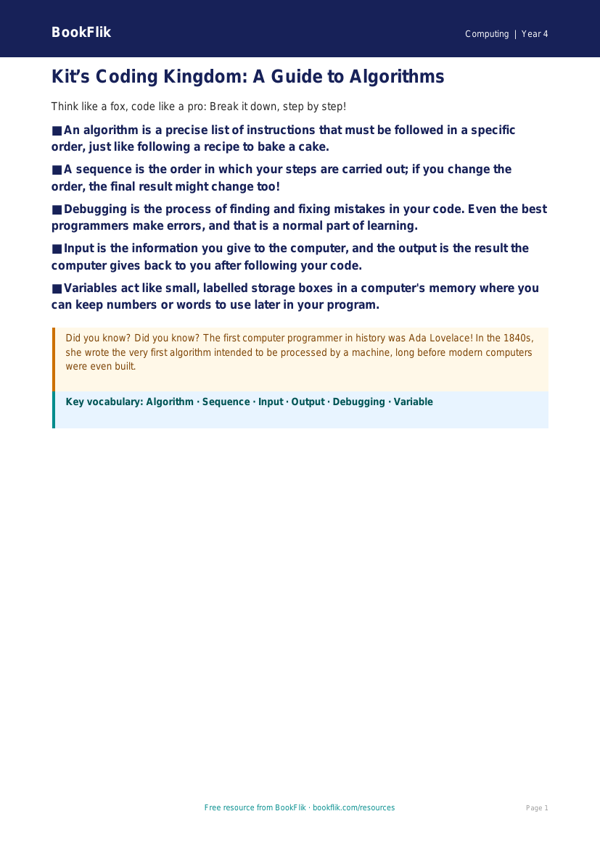
Brighten up your classroom walls with our vibrant and engaging Computing coding poster year 4 core resource. Designed specifically for Year 4 students, this educational tool simplifies the fundamental concepts of programming, making abstract ideas feel tangible and fun. As children embark on their digital journey, this resource provides a clear, visual reference for understanding algorithms, loops, and debugging.
By using this Computing coding poster year 4 core, teachers can help pupils grasp how to design, write, and debug programs that accomplish specific goals. The content is carefully aligned with the Australian Curriculum (ACARA), specifically focusing on the requirement for pupils to use sequence, selection, and repetition in programs. It features Kit, our clever fox, who guides students through the logical steps of computational thinking. Whether you are introducing a new unit on block-based coding or reinforcing existing skills, this poster acts as an essential support for learners working at the expected standard.
Our Computing coding poster year 4 core is perfect for wall displays, desk mats, or guided group work. It encourages children to break down complex problems into smaller, manageable steps, fostering the resilience needed to become successful programmers. The language used is age-appropriate and encouraging, ensuring that every student feels confident when tackling their next digital challenge.
To help you check understanding, the download includes five quick-fire questions:
1. What is an algorithm?
2. Why is debugging an important part of the coding process?
3. Can you explain what a loop does in a sequence of code?
4. If a program does not run as expected, what is the first thing you should check?
5. How does Kit the fox use logic to solve puzzles?
This resource is a fantastic way to bring computational thinking to life. Download your copy today and inspire the next generation of digital creators with clear, curriculum-focused learning tools.
Preview the worksheet
If the preview does not load, open the PDF in a new tab.