
Free Algorithms Quiz | Year 4 Supported | BookFlik
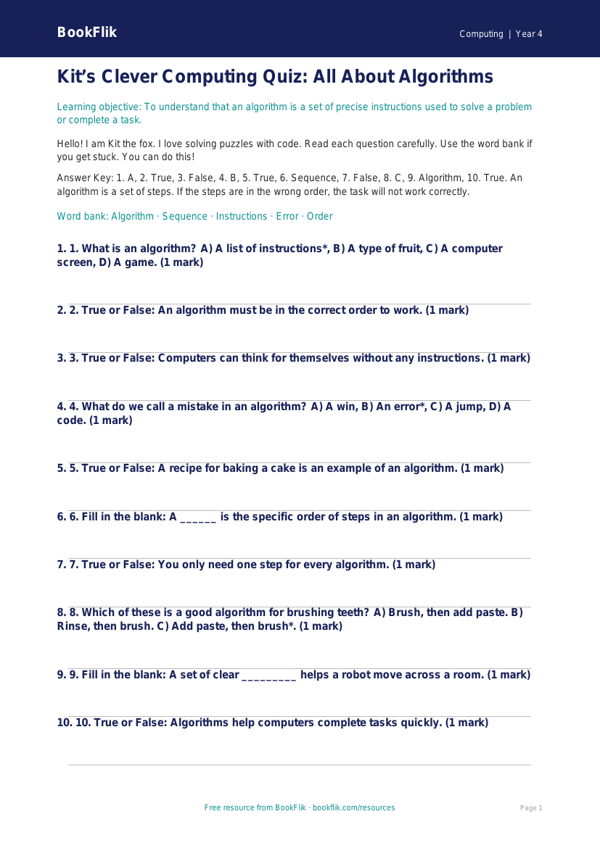
Boost your classroom learning with our Computing algorithms quiz year 4 supported resource. Designed specifically for pupils who need extra scaffolding, this engaging activity introduces the basics of step-by-step instructions in a clear and accessible way.
This Computing algorithms quiz year 4 supported resource features Max the monkey, who loves to turn every task into a logical puzzle. By following Max’s simple steps, children will learn how to break down a complex problem into a sequence of smaller, manageable actions. This is a core requirement of the UK National Curriculum for Key Stage 2, which asks students to design, write, and debug programs.
We have carefully crafted this worksheet to be inclusive for all learners. The language used is simple, and the sentences are short to help build confidence. We have included visual cues and sentence starters to guide students through each task. Instead of open-ended questions, children will find structured frames that help them order their thoughts. This Computing algorithms quiz year 4 supported material includes a helpful word bank at the bottom of the page, ensuring that key vocabulary like sequence, input, and output is always close at hand.
Teachers can use this resource as a warm-up activity, an independent task for pupils needing additional support, or as part of a small-group intervention session. It is perfect for checking understanding after an introductory lesson on how computers follow instructions. Because the content is warm and encouraging, it helps reduce anxiety around technical subjects.
Download this free resource today to help your Year 4 students master the logic behind programming. It is a fantastic way to ensure every child feels successful while developing their computational thinking skills. With Max the monkey leading the way, your students will find that understanding algorithms is as easy as following a recipe for success!
Preview the worksheet
If the preview does not load, open the PDF in a new tab.