
Free Debugging Activity Sheet | Year 4 Supported | BookFlik
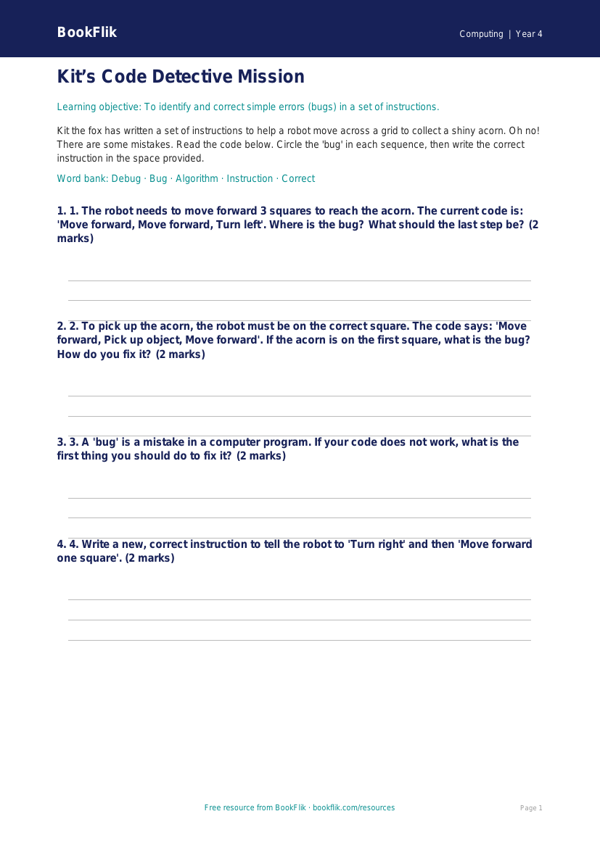
Help your students master the basics of coding with our new Computing debugging activity sheet year 4 supported. This resource is designed specifically for children who require extra scaffolding to grasp the concepts of identifying and fixing errors in a sequence.
In this lesson, children join Kit the fox as he tries to follow a set of instructions to build a woodland den. However, Kit has made a few silly mistakes in his plan! Learners will look at his instructions, spot the errors, and rewrite them so the sequence works perfectly. This Computing debugging activity sheet year 4 supported focuses on the Year 4 National Curriculum requirement to detect and correct errors in algorithms. By breaking down complex logic into manageable, bite-sized steps, students gain confidence in their computational thinking skills.
Teachers can use this resource as a guided classroom activity or as a focused intervention session for pupils who need more support. The sheet uses simple language, clear visual cues, and short, structured tasks that prevent cognitive overload. Each section provides sentence starters and a helpful word bank at the bottom to assist with spelling and vocabulary retention. This ensures that every child can engage with the core principles of debugging without feeling overwhelmed by technical jargon.
Our Computing debugging activity sheet year 4 supported is fully aligned with UK National Curriculum standards for Key Stage 2. It encourages children to approach problems with patience and persistence, turning mistakes into valuable learning opportunities. Whether used as a starter task or a main activity, this printable sheet provides a warm, encouraging environment for developing essential digital literacy. Download this free, original resource today to help your Year 4 class become confident, logical thinkers who are ready to tackle any coding challenge that comes their way.
Word Bank:
Algorithm – A set of rules to follow.
Bug – A mistake in the code.
Debug – To fix the mistake.
Sequence – The order of steps.
Correct – To make it right.
Preview the worksheet
If the preview does not load, open the PDF in a new tab.