
Free E Safety Worksheet | Year 3 Core | BookFlik
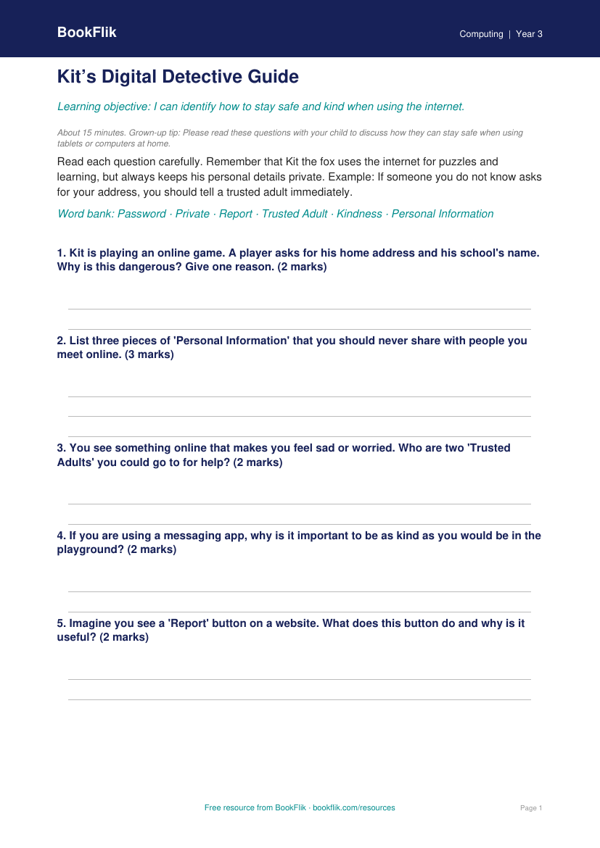
Teaching young children how to stay safe online is an essential part of the primary school curriculum. Our Computing e safety worksheet year 3 core resource is designed to help pupils understand how to navigate the digital world with confidence and caution. This engaging activity pack features Kit the fox, who guides children through important scenarios about sharing personal information and being kind to others on the internet.
By using this Computing e safety worksheet year 3 core, students will learn how to identify private information, such as their home address, full name, and school name. They will practise identifying what is safe to share and what should be kept private. The exercises are perfectly aligned with the UK National Curriculum, focusing on the importance of using technology respectfully and responsibly. Teachers can use these materials during ICT lessons to spark classroom discussions, while parents can use them at home to reinforce positive digital habits.
The content is written specifically for children aged 7 to 8, using clear British English and familiar scenarios like playground interactions and online games. We have ensured that the language is accessible, with simple instructions that promote independent learning. As a Computing e safety worksheet year 3 core resource, it meets the expected standard for Year 3 pupils, providing a balanced mix of recall questions and real-world application tasks.
For fast finishers, the sheet includes an extension challenge where children can write their own golden rules for staying safe online. This helps pupils think critically about their digital footprint and encourages them to become responsible digital citizens. Whether you are planning a lesson for a busy school day or looking for extra practice at home, this resource provides a warm, encouraging, and safe way to introduce vital computing skills to Key Stage 2 learners.
How to use this worksheet
- Time: about 15 minutes
- At home: Please read these questions with your child to discuss how they can stay safe when using tablets or computers at home.
- In the classroom: Use this to spark a class discussion about real-world scenarios children might face when playing games or using school devices.
Preview the worksheet
If the preview does not load, open the PDF in a new tab.