
Free Internet Safety Quiz | Year 3 Core | BookFlik
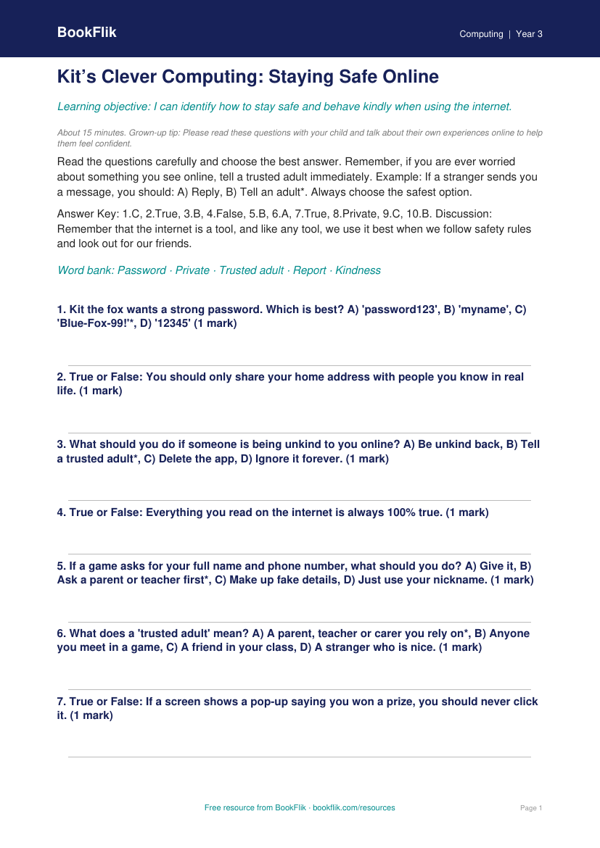
Boost your classroom or home learning with our engaging Computing internet safety quiz year 3 core resource. Designed specifically for seven to eight-year-olds in the UK, this activity helps children navigate the digital world with confidence and care. As pupils move through Key Stage 2, understanding how to stay safe online is an essential skill. Our Computing internet safety quiz year 3 core covers vital topics such as keeping personal information private, recognising trustworthy websites, and knowing what to do if something online makes them feel uncomfortable.
In this quiz, children join Kit the fox, our clever computing expert, as he solves puzzles about digital footprints and password security. By following Kit’s journey, students learn the importance of never sharing their full name, school address, or passwords with people they do not know. The questions are carefully crafted to match the UK National Curriculum, ensuring that learners are meeting the expected standard for Year 3.
Teachers can use this Computing internet safety quiz year 3 core as a quick starter activity to spark a class discussion about technology. Parents will find it an excellent tool for talking through screen time and online behaviour at home. The resource is clear, positive, and easy to read, using simple sentences to help children feel empowered rather than worried.
We have included five to seven questions that test recall and application, helping children identify safe choices in everyday scenarios. For fast finishers, there is an extension task that invites them to create their own internet safety poster for the classroom wall. Whether used in a busy Manchester primary school or for home study in a quiet village, this quiz provides the perfect foundation for responsible digital citizenship. Download it today to help your class explore the internet safely and smartly with Kit the fox.
How to use this quiz
- Time: about 15 minutes
- At home: Please read these questions with your child and talk about their own experiences online to help them feel confident.
- In the classroom: Use this to spark a class discussion about real-world scenarios children might face when using tablets or computers.
Preview the worksheet
If the preview does not load, open the PDF in a new tab.