
Free Internet Safety Flashcards | Year 4 Supported | BookFlik
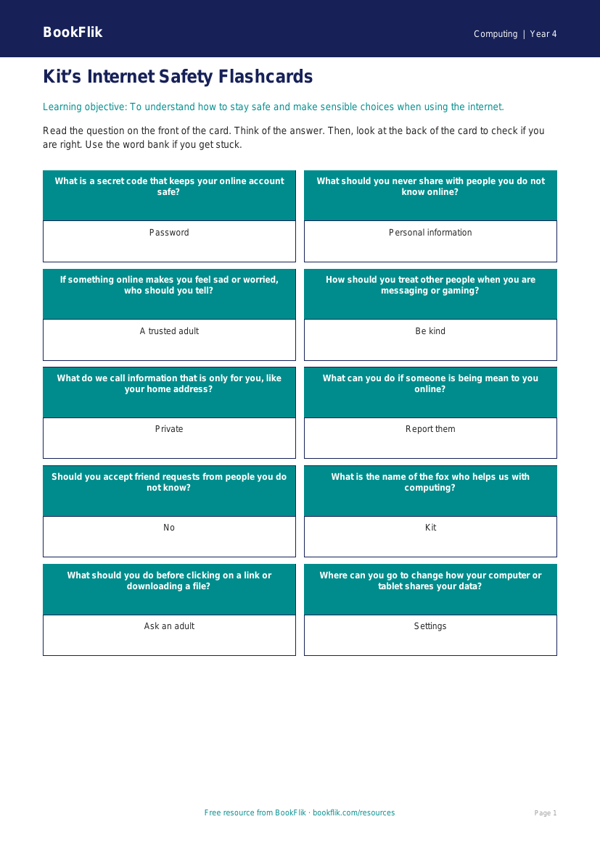
Looking for a simple way to teach digital literacy? Our Computing internet safety flashcards year 4 supported pack is the perfect classroom resource. Designed specifically for learners who need extra help, these flashcards break down complex online safety concepts into easy, manageable steps.
These Computing internet safety flashcards year 4 supported resources are aligned with the UK National Curriculum, helping children understand how to use technology safely and respectfully. Each card focuses on a single concept, such as keeping personal information private, recognising kind online behaviour, and what to do if something online makes them feel worried. By using clear, bold text and simple imagery, these cards help children build confidence with their digital skills.
Teachers can use these Computing internet safety flashcards year 4 supported tools in several ways. They are ideal for small group interventions, one-to-one support sessions, or as a quick morning starter activity. Because the language is simplified and the sentences are short, they are perfect for SEN (Special Educational Needs) or EAL (English as an Additional Language) learners who may find standard textbooks overwhelming. Each card includes a sentence starter or a visual prompt to encourage students to talk about their online experiences in a safe environment.
The pack includes 10 double-sided cards, each featuring a key term on the front and a simple, supportive explanation on the back. We have included a helpful word bank at the bottom of the worksheet to reinforce key vocabulary. By focusing on the essential rules of being a good digital citizen, this resource ensures that every child, regardless of their reading level, can participate in important discussions about staying safe online. Download this essential support resource today to help your pupils navigate the digital world with kindness, care, and confidence. It is a vital addition to any Year 4 computing lesson plan.
Preview the worksheet
If the preview does not load, open the PDF in a new tab.