
Free Internet Safety Worksheet | Year 5 Core | BookFlik
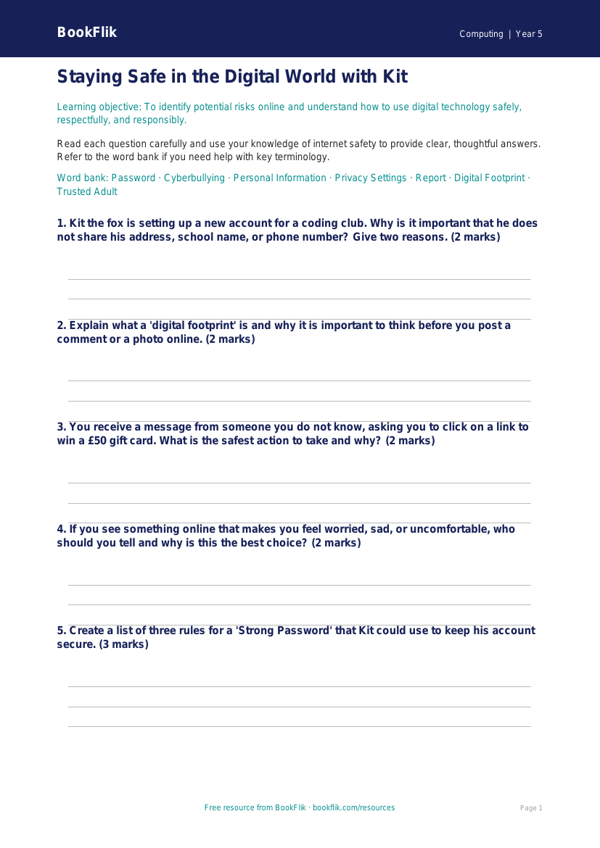
Boost your classroom’s digital literacy with our engaging Computing internet safety worksheet year 5 core. Designed specifically for Year 5 pupils, this resource provides a structured way for students to explore the complexities of the online world while staying safe.
In this lesson, Kit the quick-thinking fox guides students through essential concepts such as identifying reliable sources, understanding digital footprints, and recognising the importance of keeping personal information private. By working through these scenarios, children will learn how to make responsible choices when navigating websites, forums, and online games. This Computing internet safety worksheet year 5 core is perfectly aligned with the UK National Curriculum, which requires students to use technology safely, respectfully, and responsibly, while recognising acceptable and unacceptable behaviour.
Teachers can use this resource as a standalone starter activity, a homework task, or a springboard for a broader class discussion on cyber-security. The worksheet includes 5-7 varied questions designed to test recall of key facts, comprehension of online scenarios, and the application of safety rules in real-world situations. We have ensured that the language is age-appropriate, encouraging students to think critically about the data they share and the people they interact with online.
As part of our commitment to quality education, this Computing internet safety worksheet year 5 core is pitched at the expected standard for Year 5 learners. It strikes the perfect balance between informative content and interactive tasks, ensuring that pupils feel empowered rather than overwhelmed by the topic. Whether you are prepping for Safer Internet Day or simply reinforcing good digital habits throughout the term, this resource offers a warm, clear, and professional approach to a vital subject. Download your copy today to help your class become confident, savvy, and safe digital citizens who know exactly how to protect their privacy while exploring the wonders of the internet.
Preview the worksheet
If the preview does not load, open the PDF in a new tab.