
Free Internet Safety Writing Frame | Year 5 Core | BookFlik
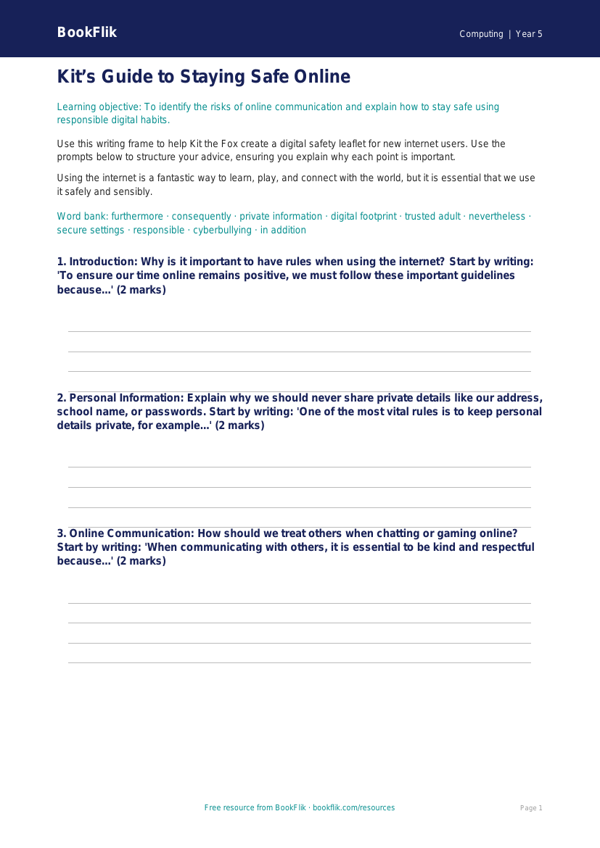
Boost your pupils’ digital literacy with our free Computing internet safety writing frame year 5 core resource. Designed specifically for the UK National Curriculum, this scaffolded activity helps children articulate their understanding of safe online behaviour in a structured and engaging way.
In Year 5, pupils are expected to understand how to evaluate digital content and recognise the importance of protecting personal information. This Computing internet safety writing frame year 5 core provides the perfect starting point for classroom discussions. Our original character, Kit the fox, guides the learners through the task, offering clever tips on how to identify reliable sources and maintain privacy while using the internet. By using this frame, students will learn to identify potential online risks, understand the importance of reporting concerns to a trusted adult, and develop the language needed to explain why digital footprints matter.
Teachers can use this resource as a standalone lesson starter or as part of a broader unit on online safety and digital citizenship. It is perfectly aligned with the Year 5 Computing curriculum, ensuring that your class meets the statutory requirements for safe and responsible internet use. The writing frame is organised into clear sections, allowing pupils to plan their thoughts before drafting a final response. This makes it an ideal tool for mixed-ability classrooms, as the clear structure supports independent work while encouraging critical thinking.
This Computing internet safety writing frame year 5 core is set at the expected standard, featuring a mix of recall and application questions. The resource includes five to seven carefully crafted tasks, such as defining what constitutes personal data, creating a list of rules for safe browsing, and explaining how to handle unkind messages. Download this free resource today to help your Year 5 students become safer, more confident, and more responsible digital explorers.
Preview the worksheet
If the preview does not load, open the PDF in a new tab.