
Free Networks Flashcards | Year 4 Supported | BookFlik
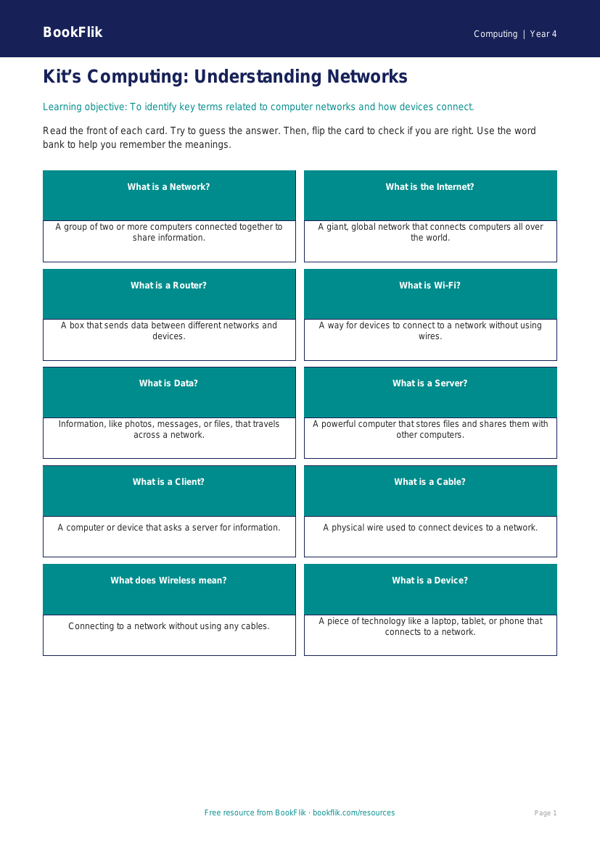
Help your pupils master the basics of digital connectivity with our Computing networks flashcards year 4 supported resource. Designed specifically for Year 4 students who require extra scaffolding, these flashcards break down complex technical concepts into simple, manageable pieces.
These Computing networks flashcards year 4 supported are perfectly aligned with the UK National Curriculum for Key Stage 2. They focus on the core requirements of understanding what a network is, how computers communicate, and the role of servers and routers. By using clear visuals and simplified definitions, this resource makes abstract computing concepts feel concrete and easy to understand.
Teachers can use these materials in several ways. They are excellent for small group interventions, as a starter activity to build confidence, or as a matching game to reinforce key vocabulary. Because this set is a Computing networks flashcards year 4 supported pack, each card includes a short, punchy definition and a visual icon to aid memory retention. We have removed jargon and replaced it with accessible language to ensure that all learners can participate fully in the lesson.
This resource is ideal for SEN pupils or those working below the expected level who benefit from high-contrast visuals and repetitive learning structures. Each card comes with a fill-in-the-blank prompt or a simple question to encourage active engagement. By focusing on the fundamentals, such as the internet, cables, and wireless signals, your students will build a strong foundation for future computing topics.
Download these free printable flashcards today to provide your class with the extra support they need to succeed. Whether you are teaching a whole class or working with a small group, these cards will make your computing lessons more inclusive, engaging, and effective. Help your students connect the dots with these essential classroom tools.
Preview the worksheet
If the preview does not load, open the PDF in a new tab.