
Free Spreadsheets Quiz | Year 5 Core | BookFlik
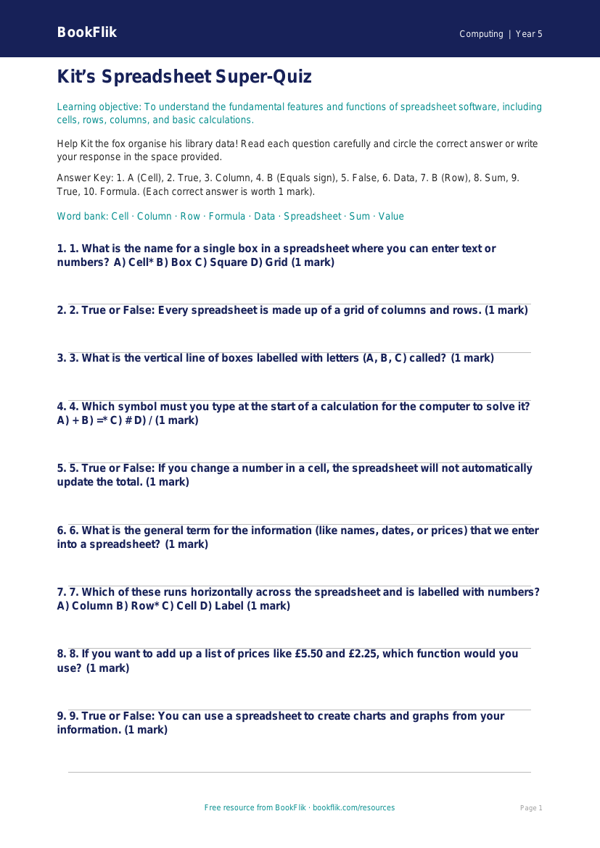
Boost your classroom learning with our engaging and interactive Computing spreadsheets quiz year 5 core. Designed specifically for pupils aged 9 to 10, this resource helps children master the foundational skills required to navigate and use spreadsheet software effectively.
As students join Kit the fox on a digital adventure, they will explore how to organise data into rows and columns, identify cell references, and understand how to use simple formulas to calculate totals. This Computing spreadsheets quiz year 5 core is perfectly aligned with the UK National Curriculum, which requires Year 5 students to use technology to collect, analyse, evaluate, and present data and information. By completing this activity, pupils will build the confidence needed to turn raw numbers into clear, readable information.
Teachers can use this resource as a quick starter activity to assess prior knowledge, a plenary task to consolidate learning after a practical lesson, or as an independent homework assignment. Because it is a Computing spreadsheets quiz year 5 core, the questions focus on expected standards, ensuring that all learners can grasp the core concepts of data handling. The quiz includes seven varied questions, ranging from simple recall of interface features to applying basic mathematical logic to solve a data-based puzzle.
Whether your class is just beginning their journey into spreadsheets or looking to sharpen their analytical skills, this quiz provides a structured and supportive way to track progress. Each question is carefully written to mirror the technical vocabulary found in the primary computing curriculum, such as labels, values, cells, and ranges. Download this free resource today to provide your pupils with a fun, purposeful, and curriculum-linked way to practise their digital literacy skills while developing the logical thinking required for success in computing and beyond. Access the full set of questions and teacher answer keys on our main dashboard.
Preview the worksheet
If the preview does not load, open the PDF in a new tab.