
Free Structures Assessment | Year 4 Supported | BookFlik
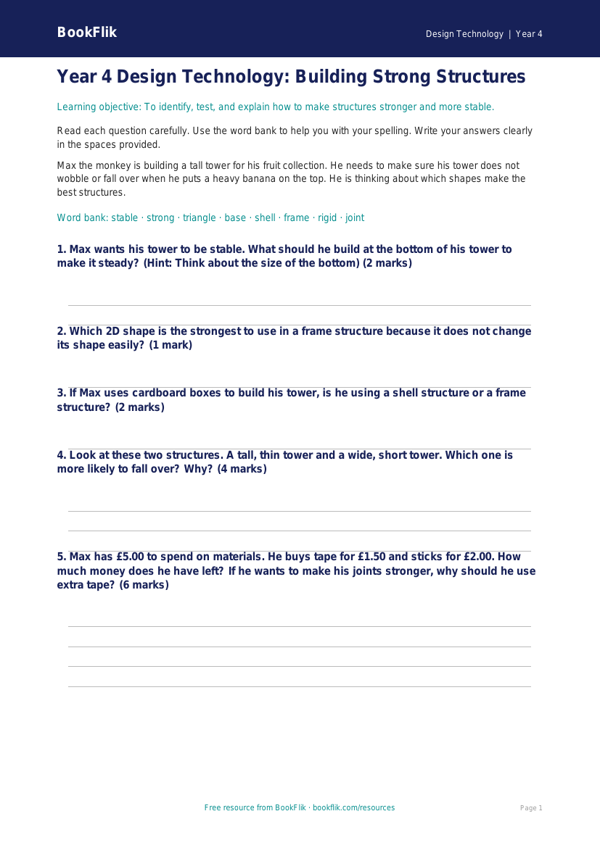
Boost your classroom confidence with our latest resource, the Design Technology structures assessment year 4 supported pack. This free printable resource is specifically designed for pupils who require extra scaffolding when exploring how structures work. Created for Year 4 learners, this tool aligns perfectly with the UK National Curriculum requirements for Design Technology, focusing on building stable and strong structures.
In this assessment, students will investigate how shapes like triangles and squares provide strength. Through our Design Technology structures assessment year 4 supported activities, children will identify strong materials and learn why certain shapes are used in buildings and bridges. The resource features Max the monkey, who loves to turn every building challenge into a maths puzzle. Max helps guide pupils through the questions, making the learning experience feel like a friendly adventure rather than a test.
Teachers can use this resource as an end-of-unit check or as a formative assessment to see where pupils might need extra help. Because this is a Design Technology structures assessment year 4 supported resource, it uses simplified vocabulary, short sentences, and visual cues. We have included a helpful word bank at the bottom of the page to build student confidence and provide the necessary scaffolding for independent work. Each task includes clear answer frames to help pupils structure their responses effectively.
Our materials are completely free and ready to print, saving you valuable planning time while ensuring every child in your classroom can access the curriculum. By focusing on clear, bite-sized tasks, this assessment helps teachers identify which pupils understand the principles of stability and which might need a little more practice. Download this resource today to support your learners as they build their knowledge of structures, ensuring that every student has the chance to succeed in their Design Technology journey.
Preview the worksheet
If the preview does not load, open the PDF in a new tab.