
Free Instructions Activity Sheet | Year 4 Supported | BookFlik
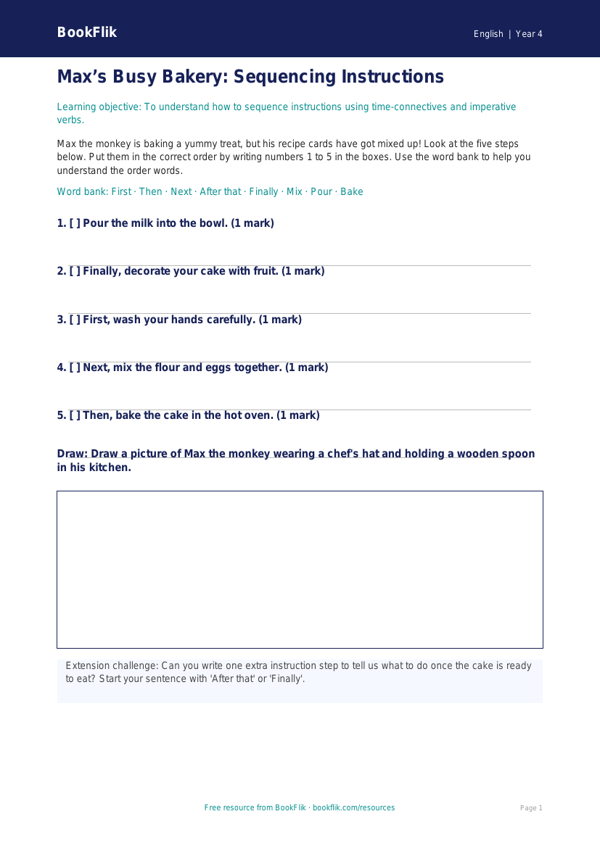
Boost your pupils’ writing confidence with our engaging English instructions activity sheet year 4 supported resource. Designed specifically for Year 4 learners who require extra scaffolding, this printable worksheet breaks down the essential features of instructional writing into manageable, bite-sized steps.
In line with the UK National Curriculum, this English instructions activity sheet year 4 supported resource helps children identify and use imperative verbs, chronological markers, and clear, numbered steps. By following the adventures of Max the monkey, who needs help writing a recipe for a fruity snack, pupils will learn how to structure their writing logically. The activity uses simple vocabulary, short sentences, and visual prompts to ensure that every learner can succeed.
Teachers can use this resource during whole-class modelled writing sessions, small group interventions, or as a guided task for pupils working below age-related expectations. The differentiated approach provides sentence starters and a helpful word bank at the bottom of the page, reducing cognitive load and allowing children to focus on the structure of their instructions. Whether you are teaching a unit on how to make a sandwich or how to play a playground game, this flexible English instructions activity sheet year 4 supported pack acts as a perfect foundation for developing core literacy skills.
Our carefully crafted materials ensure that all children, regardless of their starting point, can participate in the joy of writing. By using relatable characters like Max, we make the process of learning about formal writing styles fun and accessible. Download this resource today to provide your classroom with a structured, supportive, and curriculum-aligned tool that helps pupils master the art of writing clear instructions. It is an ideal addition to your Year 4 English toolkit, ensuring that no learner is left behind as they develop their instructional writing abilities.
Preview the worksheet
If the preview does not load, open the PDF in a new tab.