
Free Instructions Writing Frame | Year 4 Supported | BookFlik
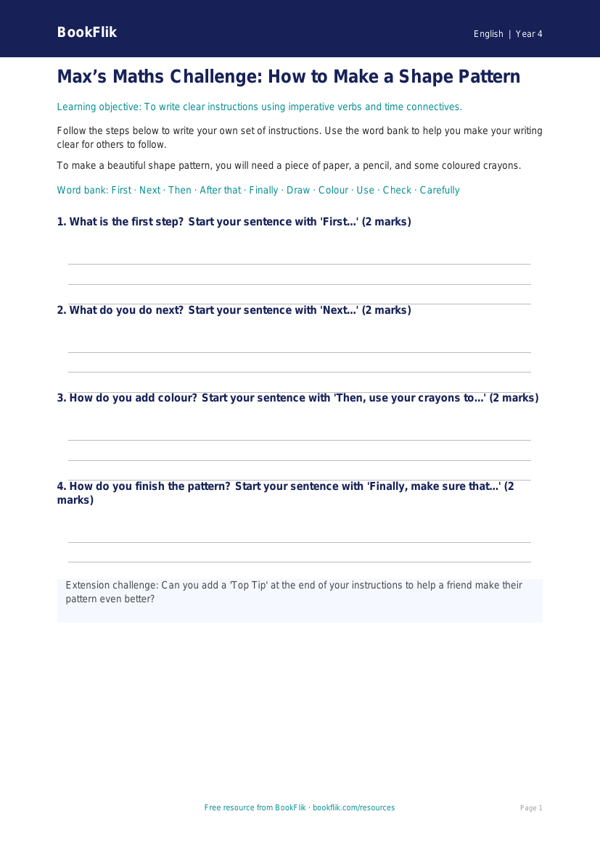
Boost your classroom resources with this free English instructions writing frame year 4 supported. Designed specifically for pupils who require extra scaffolding, this resource helps children master the art of writing clear, sequential steps.
In Year 4, the National Curriculum focuses on using organisational devices such as headings, subheadings, and numbered lists to structure non-fiction writing. This resource breaks down the task into manageable chunks, helping students understand how to use imperative verbs and chronological conjunctions like first, next, then, and finally. By using this English instructions writing frame year 4 supported, children will gain confidence in structuring their ideas logically.
Teachers can use this template for various classroom activities, such as writing a recipe for a healthy snack, explaining how to plant a seed, or describing how to play a simple game. The resource features clear visual cues and sentence starters that act as prompts, ensuring that every learner can successfully complete their writing task. Because this English instructions writing frame year 4 supported is differentiated, it is perfect for SEN groups or emerging writers who need a little extra help to get their thoughts onto the page.
The resource includes a helpful word bank at the bottom, which provides vocabulary for common actions and time connectives. This helps students focus on their sentence structure without worrying about spelling. The activities are short, structured, and easy to follow, making them ideal for independent work or guided group sessions.
Aligned with the UK National Curriculum, this writing frame ensures your students meet their learning objectives while feeling supported and encouraged. Download this essential tool today to help your Year 4 class write clear, accurate, and engaging instructions with ease. It is a fantastic way to build writing stamina and improve literacy skills in a warm, structured, and positive classroom environment.
Preview the worksheet
If the preview does not load, open the PDF in a new tab.