
Free Report Writing Worksheet | Year 4 Supported | BookFlik
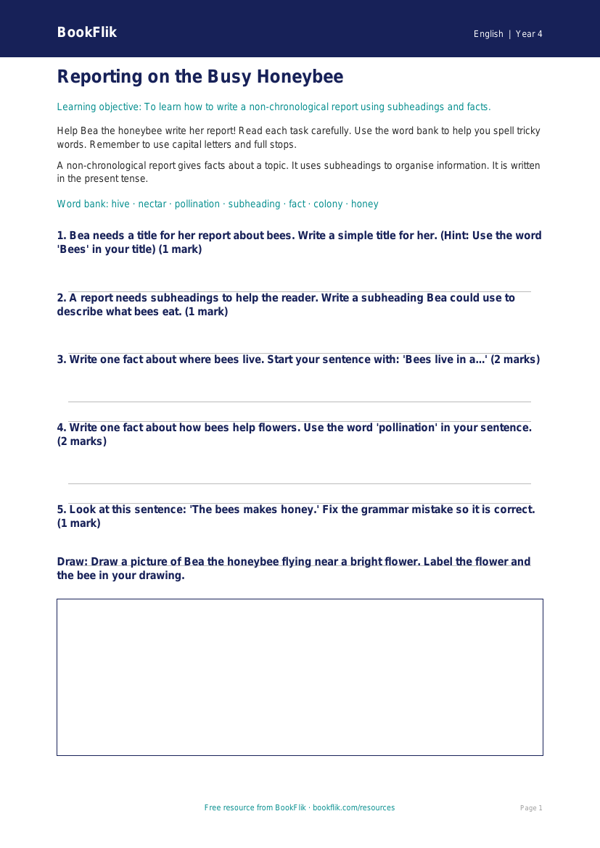
Boost your classroom engagement with our free English report writing worksheet year 4 supported. Designed specifically for Year 4 pupils who require extra scaffolding, this resource helps children master the art of non-fiction report writing. By using our friendly BookFlik characters, such as Nova the owl and Finn the dolphin, students will learn to identify key features of a report, including headings, subheadings, and factual statements.
This English report writing worksheet year 4 supported is fully aligned with the UK National Curriculum, helping students to organise their ideas and use appropriate language to describe animals or natural phenomena. We understand that some learners need a gentle approach; therefore, this resource features shorter sentences, clear visual cues, and helpful sentence starters to build confidence. The activities are broken down into small, manageable steps, allowing pupils to practise writing clear, informative paragraphs without feeling overwhelmed.
Teachers can use this English report writing worksheet year 4 supported as an independent task during literacy rotations, as a guided group activity, or as a helpful intervention tool for SEN learners. The structured answer frames ensure that students can focus on the core skills of report writing while feeling supported by clear, simple instructions. With a useful word bank included at the bottom of the page, students are encouraged to expand their vocabulary while keeping their writing focused and factual.
This resource provides a warm, encouraging way to introduce non-fiction writing techniques. By simplifying complex tasks into bite-sized questions, you can ensure every child in your class makes progress. Download this ready-to-use worksheet today to provide your Year 4 students with the perfect balance of challenge and support.
Word Bank:
Heading – A title for a section.
Fact – Something that is true.
Paragraph – A group of sentences about one idea.
Subheading – A small title inside a report.
Preview the worksheet
If the preview does not load, open the PDF in a new tab.