
Free Vocabulary Writing Frame | Year 4 Supported | BookFlik
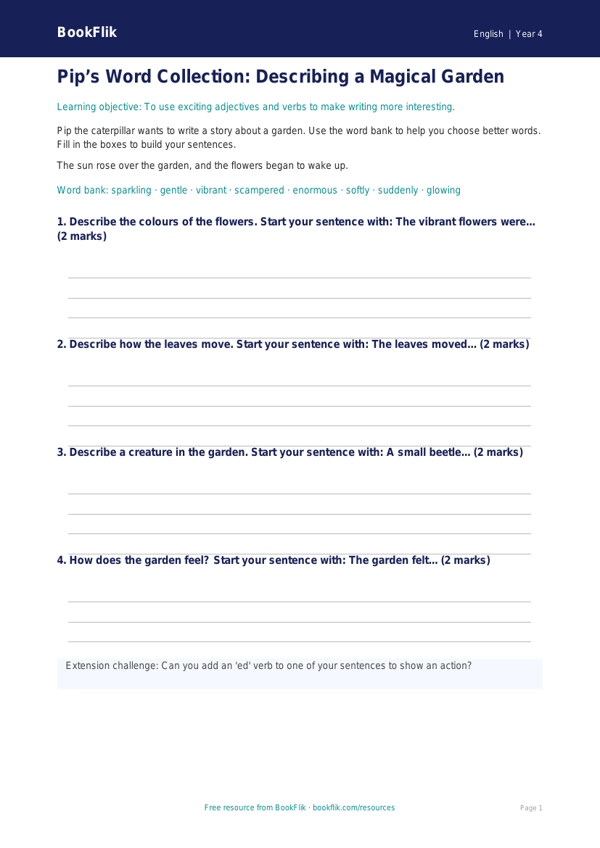
Boost your classroom resources with our free English vocabulary writing frame year 4 supported. This resource is designed specifically for children who need extra scaffolding to develop their descriptive writing skills. Using our friendly character Pip the bookworm, this worksheet encourages pupils to replace simple, everyday words with more exciting alternatives to make their writing shine.
What will children learn?
Pupils will learn how to identify overused adjectives and verbs in their writing. By using the provided word bank and sentence starters, they will practise selecting precise vocabulary to describe characters, settings, and emotions. This helps children move away from basic sentences and towards more adventurous, descriptive language, which is a key requirement of the UK National Curriculum for Year 4.
How can teachers use it?
This English vocabulary writing frame year 4 supported is perfect for guided writing sessions or as an independent task for pupils working below age-related expectations. The layout is clean and uncluttered, featuring clear answer frames that help children organise their thoughts. Teachers can use this during literacy rotations or as a quick warm-up activity to build confidence in using a thesaurus or word list.
Differentiation and Curriculum Alignment
This resource is carefully differentiated for learners who need additional support. We have simplified the vocabulary and kept sentences short to reduce cognitive load. The inclusion of visual cues and sentence starters provides the necessary bridge for pupils to express their ideas clearly. By focusing on word choice, this tool supports the Year 4 English curriculum goal of using richer vocabulary to enhance meaning. This English vocabulary writing frame year 4 supported is a fantastic addition to your teaching toolkit, ensuring every child feels successful and encouraged. Download it today to help your class discover the joy of choosing the perfect word for every story.
Preview the worksheet
If the preview does not load, open the PDF in a new tab.