
Free Geometry Track Sheet | Year 5 Core | BookFlik
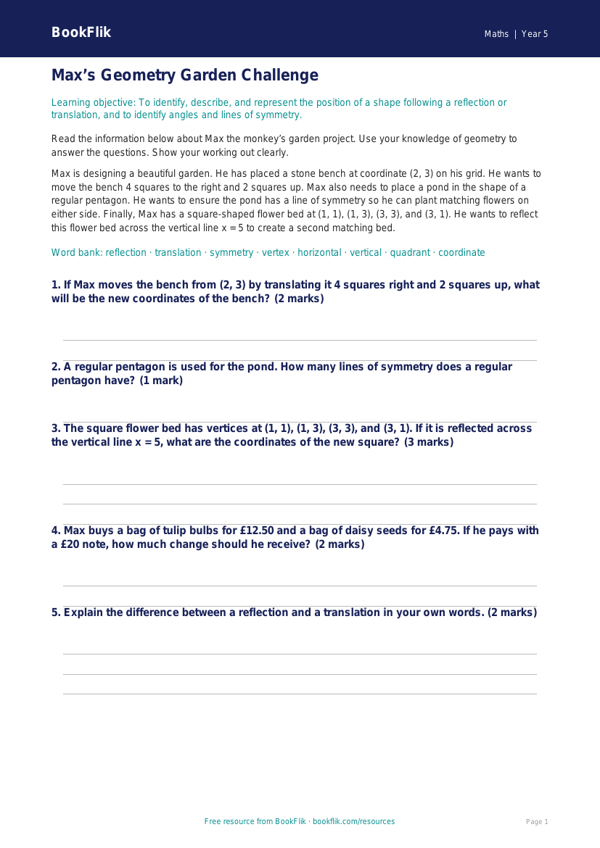
Boost your classroom engagement with our comprehensive Maths geometry track sheet year 5 core. Designed specifically for pupils working at the expected standard, this resource provides a structured way for children to master essential geometric concepts. Whether you are introducing new topics or consolidating previous learning, this tool is an excellent addition to your weekly lesson planning.
This track sheet focuses on key areas of the UK National Curriculum, including identifying 3D shapes from 2D representations, estimating and measuring angles in degrees, and calculating the perimeter of composite rectilinear shapes. Our original character, Max the monkey, guides pupils through these challenges, turning every problem into an exciting puzzle to solve. By using this Maths geometry track sheet year 5 core, students can track their own progress, fostering a sense of achievement as they tick off each successfully completed task.
The resource is fully aligned with Year 5 curriculum requirements. It includes five to seven carefully crafted questions that balance recall, comprehension, and application. For example, students will be asked to identify acute, obtuse, and reflex angles, as well as calculate missing lengths on irregular shapes. Because this is a core-level resource, the vocabulary is age-appropriate and supports learners as they transition from basic shape recognition to more complex geometric reasoning.
Teachers can use this sheet as a formative assessment tool, a plenary activity, or as targeted homework to support classroom instruction. The clear layout ensures that pupils remain focused, while the inclusion of Max the monkey adds a friendly, encouraging touch to their independent work. Download this Maths geometry track sheet year 5 core today to provide your class with the practice they need to succeed in their geometry studies. It is a fantastic, free resource that helps make maths both accessible and enjoyable for every student in your Year 5 cohort.
Preview the worksheet
If the preview does not load, open the PDF in a new tab.