
Free Rounding Template | Year 4 Core | BookFlik
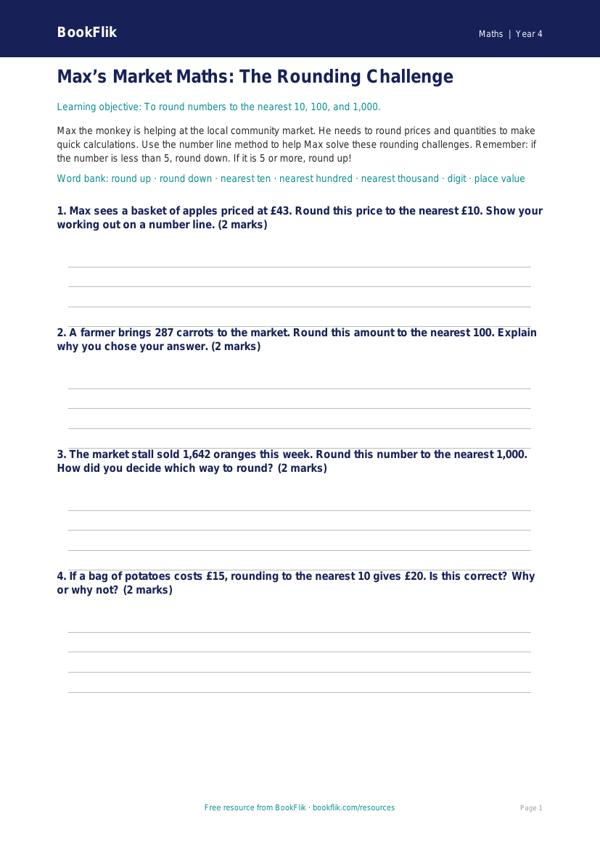
Mastering the skill of rounding numbers is a vital step in every pupil’s mathematical journey. Our new Maths rounding template year 4 core resource is designed to help children confidently round numbers to the nearest 10, 100, and 1000. Following the UK National Curriculum, this activity ensures students can identify the digit to the right of the place value they are rounding, applying the rule of rounding up or staying the same.
Max the monkey is featured throughout this resource, turning every sum into an exciting puzzle. He guides children through the logic of place value, making abstract concepts feel tangible and fun. This Maths rounding template year 4 core is perfectly suited for pupils working at the expected standard, providing a structured way to practise both independent work and collaborative classroom learning. Teachers can use this template as a warm-up activity, a focused lesson task, or even as a quick assessment tool to check pupil progress during a unit on number and place value.
Each section includes clear instructions and visual aids to support learners as they navigate larger numbers. By using this Maths rounding template year 4 core, children will develop the fluency needed to estimate answers and check their calculations for accuracy. The resource includes five to seven carefully curated questions that move from simple recall to practical application, ensuring a comprehensive understanding of the topic.
Whether you are looking to save time on lesson planning or seeking a reliable, high-quality worksheet that meets national standards, this download is an essential addition to your classroom toolkit. The layout is clean, accessible, and printer-friendly, allowing for immediate use in any primary school setting. Download this versatile resource today and help your Year 4 students master the art of rounding with precision and confidence, all while enjoying the enthusiastic company of Max the monkey.
Preview the worksheet
If the preview does not load, open the PDF in a new tab.