
Free Subtraction Worksheet | EYFS Core | BookFlik
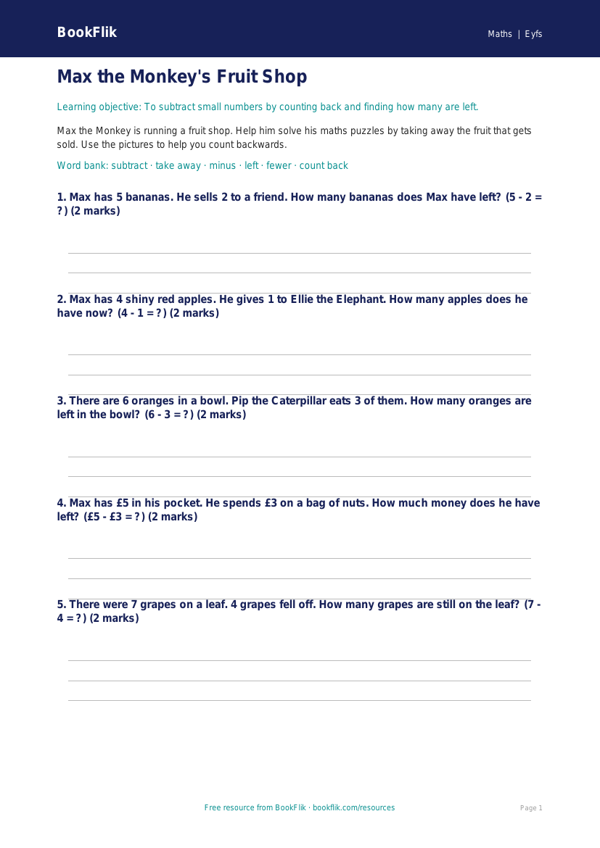
Make maths time magical with our engaging and colourful subtraction resource designed specifically for your classroom. This free Maths subtraction worksheet eyfs core activity helps children develop their early numeracy skills through fun, hands-on counting exercises.
In this lesson, children will join Max the monkey as he explores a fruit market. Max needs help taking away pieces of fruit from his basket, which introduces children to the concept of subtraction as taking away objects from a set. By using visual representations and simple number sentences, learners will build confidence in their ability to count backwards and solve basic problems using numbers up to ten. This Maths subtraction worksheet eyfs core resource is perfect for building a solid foundation in arithmetic, ensuring that pupils feel supported as they master the skill of finding how many items remain after some have been removed.
Teachers can use this sheet during small group work or as an independent task during continuous provision. It aligns perfectly with the UK National Curriculum for EYFS, specifically focusing on the Early Learning Goal for Number, where children are expected to solve problems, including doubling, halving, and sharing, as well as subtracting. The activities are designed at the expected standard, providing just the right amount of challenge for learners aged 3 to 5.
This Maths subtraction worksheet eyfs core pack includes five to seven carefully structured questions. These range from simple recall, such as identifying the number of items left after taking away, to application tasks where children must write their own subtraction sum using the £ symbol to represent the cost of items in Max’s shop. By using familiar contexts like shopping and snacks, children can relate these abstract mathematical concepts to their everyday lives. Download this resource today to provide your pupils with a fun, effective, and curriculum-linked way to practise their early subtraction skills.
Preview the worksheet
If the preview does not load, open the PDF in a new tab.