
Free E Safety Writing Frame for Grade 3 | Computing | BookFlik
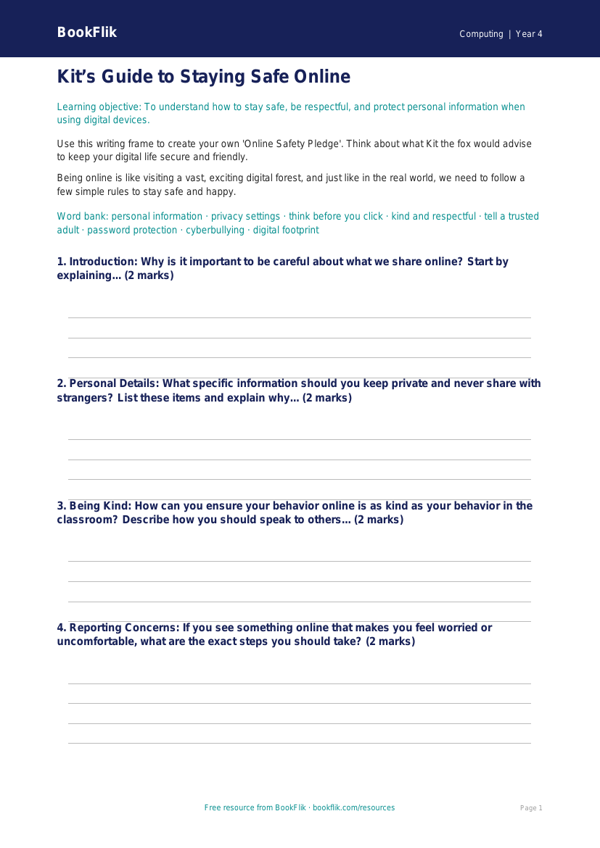
Help your Grade 3 class build essential digital awareness with our free Computing e safety writing frame year 4 core resource. Designed specifically for the Common Core State Standards, this activity helps children understand the importance of responsible internet use, privacy, and how to stay safe when communicating online.
In this lesson, our friendly character Kit the fox guides students through the complexities of the digital world. By using this Computing e safety writing frame year 4 core, children will learn how to identify potential risks, recognize the importance of strong passwords, and understand why they should never share personal information with strangers. The frame provides a clear, structured template that encourages students to think critically about their online footprint and promotes positive digital citizenship.
Teachers can use this resource as an independent writing task, a group discussion starter, or as part of a wider computing unit on digital literacy. It is perfectly aligned with the Grade 3 Computing program of study, which requires pupils to use technology safely, respectfully, and responsibly. The activities are carefully balanced to ensure they are accessible to all learners working at the expected standard, providing enough scaffolding for those who need extra support while offering space for more confident writers to expand on their ideas.
Our Computing e safety writing frame year 4 core includes five engaging questions that test recall and comprehension. Students will be asked to explain what they should do if they see something that makes them feel uncomfortable, why it is vital to keep personal details private, and how they can be kind to others in online spaces. By the end of the lesson, your pupils will be better equipped to navigate the online world with confidence and caution. Download this professional, teacher-created resource today to support your students in becoming safe and savvy digital explorers.
Preview the worksheet
If the preview does not load, open the PDF in a new tab.