
Free Programming Worksheet | Grade 4 | Computing | BookFlik
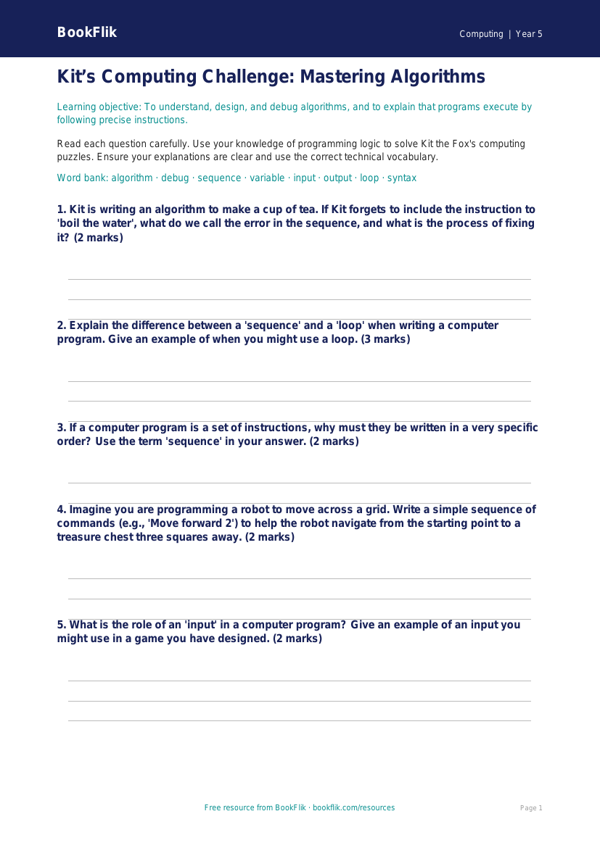
Boost your pupils’ confidence in the classroom with our engaging Computing programming worksheet year 5 core. Designed specifically for the Common Core State Standards, this resource helps children understand the fundamentals of sequence, selection, and repetition in coding. As they work through the activities, pupils will follow the lead of Kit, our quick-thinking fox, who loves solving puzzles and finding clever digital solutions.
This Computing programming worksheet year 5 core is perfect for teachers looking to bridge the gap between abstract logic and practical application. The resource introduces key terminology like algorithms, variables, and debugging, ensuring students build a solid foundation in computational thinking. Whether you are teaching a standalone lesson or integrating coding into a broader unit, these tasks provide the structure needed for students to thrive. By working through the logic puzzles provided, children will learn how to write precise instructions and predict the behavior of a program, which is a core requirement for Grade 4 computing.
We understand that every classroom is different, which is why this Computing programming worksheet year 5 core is designed at the expected standard for Grade 4 learners. It features 5 to 7 varied questions that encourage recall, comprehension, and the application of new skills. Teachers can use this as a guided practice activity, a formative assessment tool, or even as an extension task for those who need a challenge.
Our materials are completely free, original, and free from copyrighted characters, ensuring they are safe and suitable for all primary school settings. By using this resource, you are providing your class with clear, structured opportunities to develop their logical reasoning and problem-solving abilities. Download this worksheet today to help your students master the basics of programming and take their first steps into the exciting world of computer science with Kit the fox.
Preview the worksheet
If the preview does not load, open the PDF in a new tab.