
Free Spelling Track Sheet | Grade 3 | ELA | BookFlik
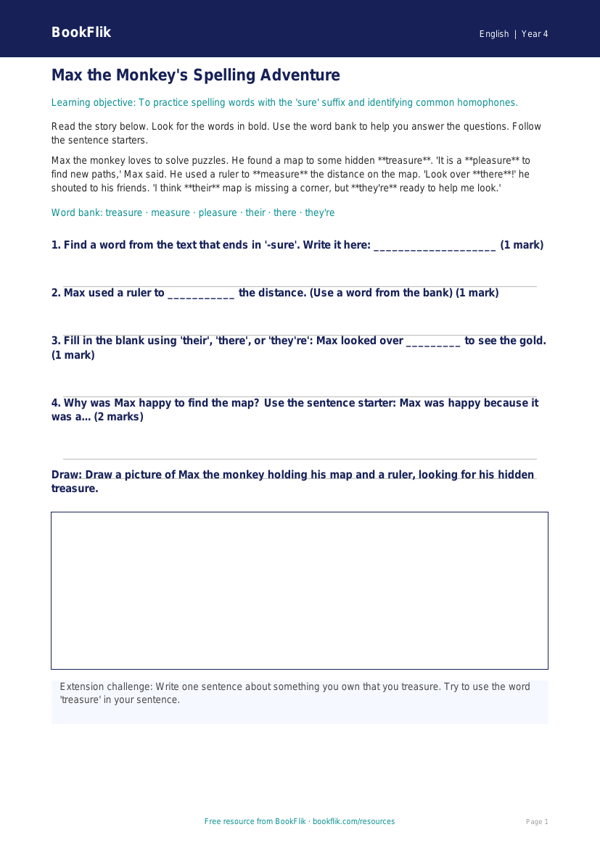
Boost your pupils’ confidence with our brand-new ELA spelling track sheet year 4 supported resource. Designed specifically for learners who need extra help, this printable tool makes mastering the Grade 3 statutory word list fun and accessible.
What will children learn?
This resource focuses on common exception words and tricky spelling patterns found in the Common Core State Standards. By using our ELA spelling track sheet year 4 supported, children will practice segmenting sounds and identifying tricky parts of words. They will work alongside Pip the caterpillar, who loves collecting words, to build their vocabulary one step at a time.
How can teachers use it?
This track sheet is perfect for small group intervention, morning work, or individual support sessions. It features short, manageable tasks that prevent overwhelm. The clear, structured layout includes sentence starters and visual cues to help pupils feel successful as they progress. Because it is an ELA spelling track sheet year 4 supported, it aligns perfectly with the National Curriculum’s expectations for spelling accuracy while providing the scaffolding necessary for emerging writers.
Differentiation and Design
We have carefully designed this resource to be inclusive. The vocabulary is simple, and the instructions are broken down into short, clear sentences. Each page includes a dedicated word bank at the bottom to reduce the pressure of recall. Whether you are using this in a mainstream classroom or a specialist setting, the clear answer frames help children track their own growth and celebrate their wins.
By focusing on high-frequency words and providing plenty of space for handwriting practice, this resource builds the essential foundations for future writing success. Download this free, no-prep track sheet today to help your Grade 3 pupils feel proud of their progress in ELA. It is a simple, effective way to ensure every child keeps up with the class while feeling supported and encouraged.
Preview the worksheet
If the preview does not load, open the PDF in a new tab.