
E Safety Activity Sheet for Class 4 | Free Download | BookFlik
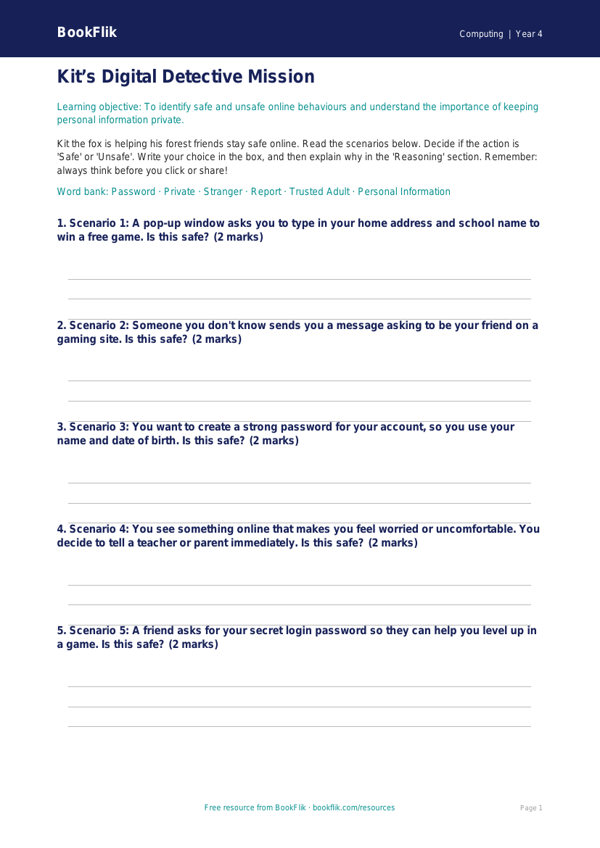
Help your pupils navigate the digital world safely with our comprehensive Computing e safety activity sheet year 4 core resource. Designed specifically for Class 4 classrooms, this free download provides a structured way to introduce essential online safety concepts, including understanding digital footprints, identifying private information, and knowing what to do if something online makes them feel uncomfortable.
Our Computing e safety activity sheet year 4 core features our clever fox character, Kit, who guides pupils through various scenarios. Kit encourages children to think critically about how they share information online and how to interact respectfully with others in digital spaces. This resource is perfectly aligned with the CBSE / NCERT Curriculum for Computing, which requires pupils to use technology safely, respectfully, and responsibly, while recognising acceptable and unacceptable behaviour.
Teachers can easily integrate this into their weekly Computing lessons or as part of a dedicated PSHE session. The sheet is designed for the expected standard of Class 4 learners, using clear language and engaging, relatable examples. The tasks include 5 to 7 questions ranging from simple recall of safety rules to applying knowledge to real-life digital dilemmas. By using this Computing e safety activity sheet year 4 core, educators can foster open classroom discussions about online boundaries and the importance of reporting concerns to a trusted adult.
This activity sheet is part of our commitment to providing high-quality, brand-free educational materials. It is ready to print and use immediately, requiring no extra preparation time. Whether you are teaching a unit on digital literacy or looking for a quick formative assessment tool, this resource offers a balanced approach to keeping children safe, confident, and informed online. Download today to support your pupils in becoming responsible digital citizens who understand how to protect their personal information and navigate the internet with care.
Preview the worksheet
If the preview does not load, open the PDF in a new tab.