
Free E Safety Poster for Class 4 Students in CBSE Schools
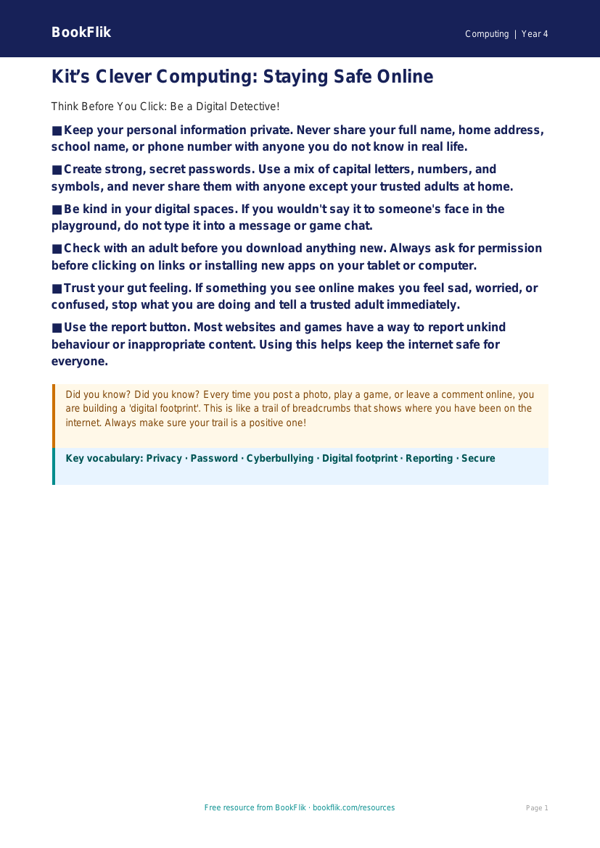
Download this vibrant and engaging Computing e safety poster year 4 core resource to help your pupils navigate the digital world with confidence and care. Designed specifically for the Class 4 classroom, this educational poster serves as a vital visual aid to reinforce essential online safety habits.
What will children learn?
This resource focuses on the core principles of staying safe online. Pupils will learn how to identify personal information that should remain private, the importance of being kind to others in digital spaces, and the steps to take if they encounter something online that makes them feel uncomfortable. By using this Computing e safety poster year 4 core, children will develop a better understanding of how to be respectful, responsible, and resilient digital citizens.
How can teachers use it?
This poster is perfect for display in your computer suite or classroom ICT corner. Teachers can use it as a starting point for class discussions during computing lessons or as a quick reference guide when pupils are working on tablets or laptops. Whether you are introducing a new topic on internet safety or simply reinforcing existing rules, this clear and colourful guide provides the perfect support.
CBSE / NCERT Curriculum Alignment
This resource is fully aligned with the CBSE / NCERT Curriculum for Computing at Key Stage 2. It directly supports the requirement for pupils to use technology safely, respectfully, and responsibly, while recognising acceptable and unacceptable behaviour.
Differentiation and Quality
This Computing e safety poster year 4 core is tailored for students working at the expected standard for Class 4. It features accessible language and clear, actionable advice. The download includes five thought-provoking questions to check pupil understanding:
1. What three pieces of personal information should you never share online?
2. Why is it important to be kind to others in a chat or game?
3. What should you do if you see something that makes you feel worried?
4. Who are the trusted adults you can talk to about your online activity?
5. Why do we have passwords, and why should we keep them secret?
Preview the worksheet
If the preview does not load, open the PDF in a new tab.