
Free E-Safety Activity Sheet | Year 5 Core | BookFlik
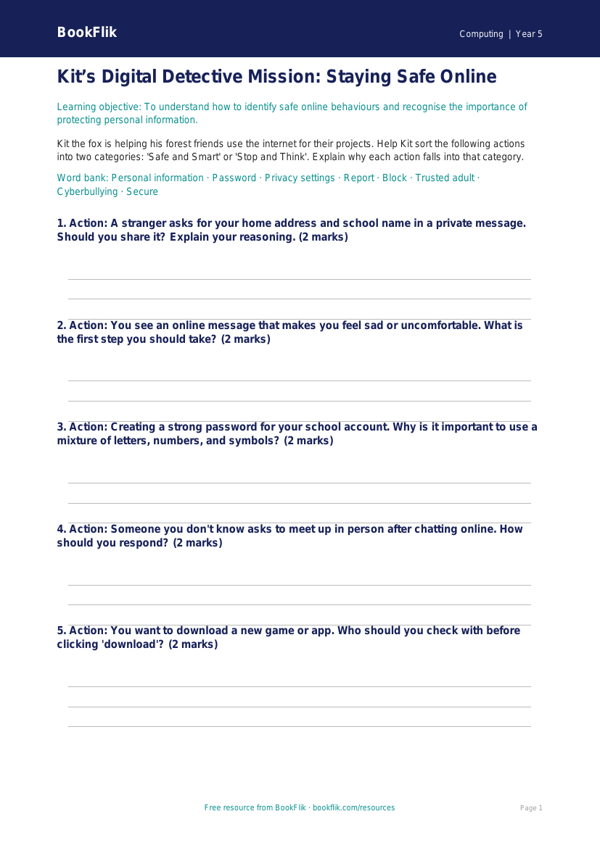
Boost your classroom digital literacy with our Computing e safety activity sheet year 5 core. Designed specifically for the UK National Curriculum, this resource helps pupils navigate the digital world with confidence and critical thinking skills. As children spend more time online, understanding how to stay safe is essential. This Computing e safety activity sheet year 5 core provides engaging scenarios that help students identify potential risks, such as understanding the importance of strong passwords, recognising phishing attempts, and knowing how to respond if they encounter something uncomfortable online.
Our original character, Kit the fox, guides students through these puzzles, encouraging them to think like clever problem-solvers when using technology. The resource is perfectly aligned with the Year 5 computing programme of study, focusing on the safe and responsible use of online communication and digital tools. Teachers can use this Computing e safety activity sheet year 5 core as a standalone lesson starter, a homework task, or a meaningful plenary activity to consolidate learning after a digital project.
The content is carefully scaffolded to meet the expected standard for Year 5 learners. It includes five to seven varied questions that range from simple recall of safety rules to applying knowledge in real-world hypothetical situations. By using this resource, you can encourage your students to become responsible digital citizens who value their privacy and respect others online. The activity sheet is easy to print, requires no preparation, and uses British English throughout. Whether you are teaching a dedicated computing lesson or integrating e-safety across the wider curriculum, this resource offers a warm, structured, and age-appropriate way to introduce complex digital concepts. Help your pupils build the habits they need for a positive online future with our expertly crafted materials. Download this free sheet today to support your computing lessons and ensure your students have the tools they need to stay safe, secure, and smart while browsing the internet.
Preview the worksheet
If the preview does not load, open the PDF in a new tab.