
Free Newspaper Writing Poster | Year 6 Core | BookFlik
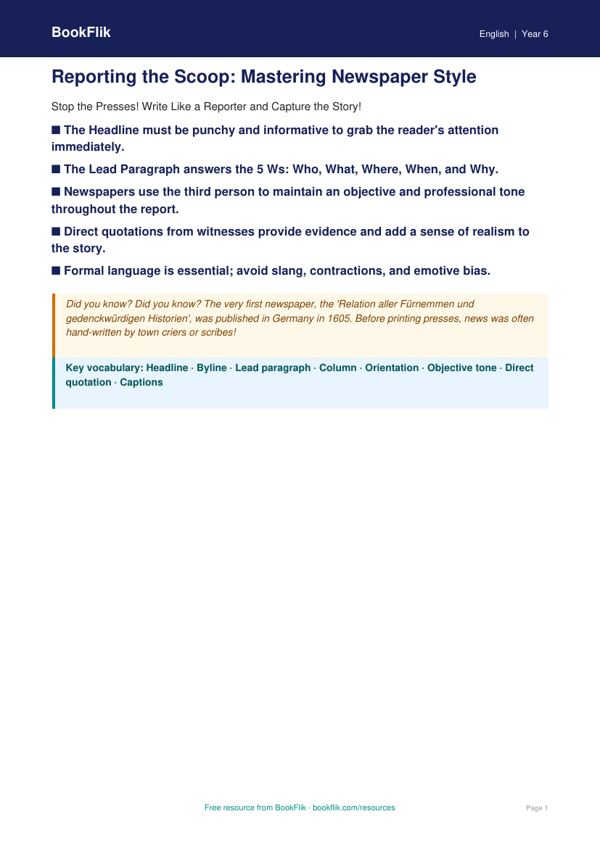
Boost your classroom walls with our vibrant and educational English newspaper writing poster year 6 core resource. Designed specifically for pupils working at the expected standard, this visual aid breaks down the essential features of journalistic writing into clear, manageable sections. Whether you are teaching a unit on reportage or preparing for writing assessments, this tool provides the perfect reference point for your students.
This English newspaper writing poster year 6 core highlights the key components of a professional news report. Pupils will learn how to craft a compelling headline, write a punchy lead paragraph that answers the five Ws (who, what, where, when, why), and use formal language to maintain an objective tone. The resource also covers the inclusion of direct and indirect speech, the importance of using columns, and how to effectively incorporate captions for images. By following these guidelines, children will develop the skills to structure their own investigative pieces with confidence and flair.
Aligned with the UK National Curriculum, this resource supports the requirements for Year 6 pupils to write for a range of purposes and audiences. Teachers can use this English newspaper writing poster year 6 core during shared writing sessions, as a prompt for independent tasks, or as a handy editing checklist for pupils to review their own work. The content is carefully curated to bridge the gap between creative storytelling and formal non-fiction writing.
The pack includes five to seven targeted questions to check understanding, ranging from identifying specific features within a sample text to applying journalistic techniques to new scenarios. This ensures that learners not only recall the facts but can also apply their knowledge to real-world writing tasks. Download this high-quality, free resource today to help your Year 6 class master the art of the newspaper report and improve their non-fiction writing skills across the curriculum.
Preview the worksheet
If the preview does not load, open the PDF in a new tab.