
Free Earthquakes Worksheet | Year 4 Supported | BookFlik
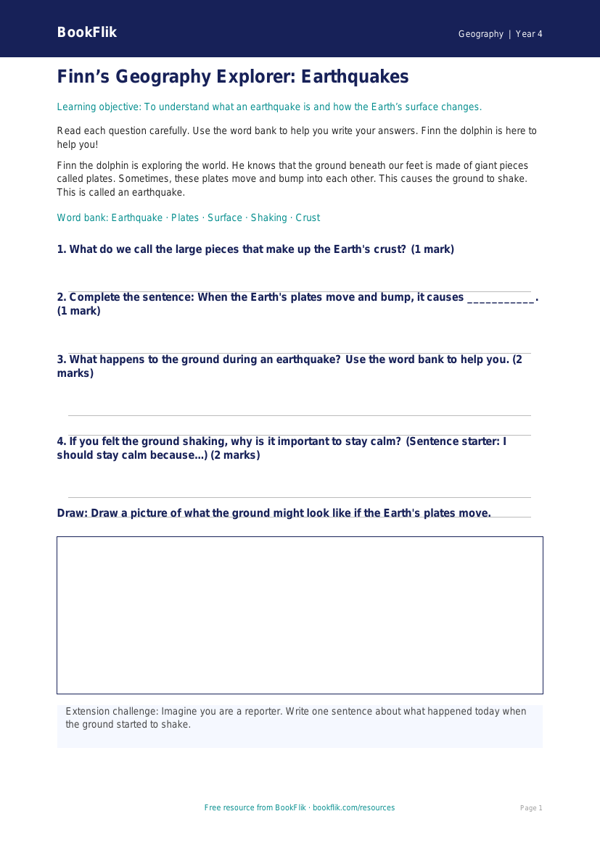
Help your pupils understand the fascinating science behind the earth with this accessible Geography earthquakes worksheet year 4 supported resource. Designed specifically for Year 4 learners who require extra scaffolding, this activity breaks down complex tectonic concepts into simple, manageable steps.
What will children learn?
This worksheet introduces the core concepts of the Earths layers, how the ground moves, and what happens during a tremor. Using our friendly guide, Finn the dolphin, pupils will explore the basics of why the ground shakes. The resource focuses on clear, short sentences and visual aids to help children grasp how the crust moves, aligning perfectly with the UK National Curriculum requirement to describe and understand key aspects of physical geography, including earthquakes.
How can teachers use it?
This Geography earthquakes worksheet year 4 supported pack is ideal for small group interventions, SEN classrooms, or as a simplified alternative for pupils who find independent writing challenging. Each task includes sentence starters and clear answer frames to boost learner confidence. The resource is structured into five short sections, ensuring pupils feel a sense of achievement as they complete each part.
Differentiation and Support
We understand that every classroom has diverse needs. This Geography earthquakes worksheet year 4 supported edition uses simplified vocabulary and includes a helpful word bank at the bottom of the page. By removing abstract jargon and focusing on key terminology, we ensure that every child can engage with the lesson content.
This resource is print-ready and perfect for busy teachers looking for high-quality, inclusive materials. By focusing on essential facts and using supportive visual cues, your class will enjoy exploring the natural world with ease. Download this essential addition to your geography toolkit today and help your pupils build their knowledge in a warm, encouraging, and structured way.
Preview the worksheet
If the preview does not load, open the PDF in a new tab.